
Tap Trail
TapTrail — You click through a site once while recording. Someone else opens the link and replays the path step by step: scroll, numbered marker, tooltip. It is a few kilobytes of steps, not a screen recording.
By Ranjith Kumar Kakkarayil · Published · Updated
I got tired of writing "click the avatar, then Settings, then Advanced…" so I built TapTrail
Every team that ships a web app has had this conversation in a chat:
"Where do I change the webhook URL?" "Click your avatar in the top right, pick Workspace settings, go to the Advanced tab, open API access, and it's the second field."
It takes longer to write than to do. And the other person still has to match your words to their screen, which never looks quite like yours. A screenshot shows one page. A screen recording shows your window, at your size, with your data, and it's out of date the next time someone moves a button.
So I built TapTrail: you click the path once, and send a link. The other person opens it and follows the same path, step by step, on the live page.
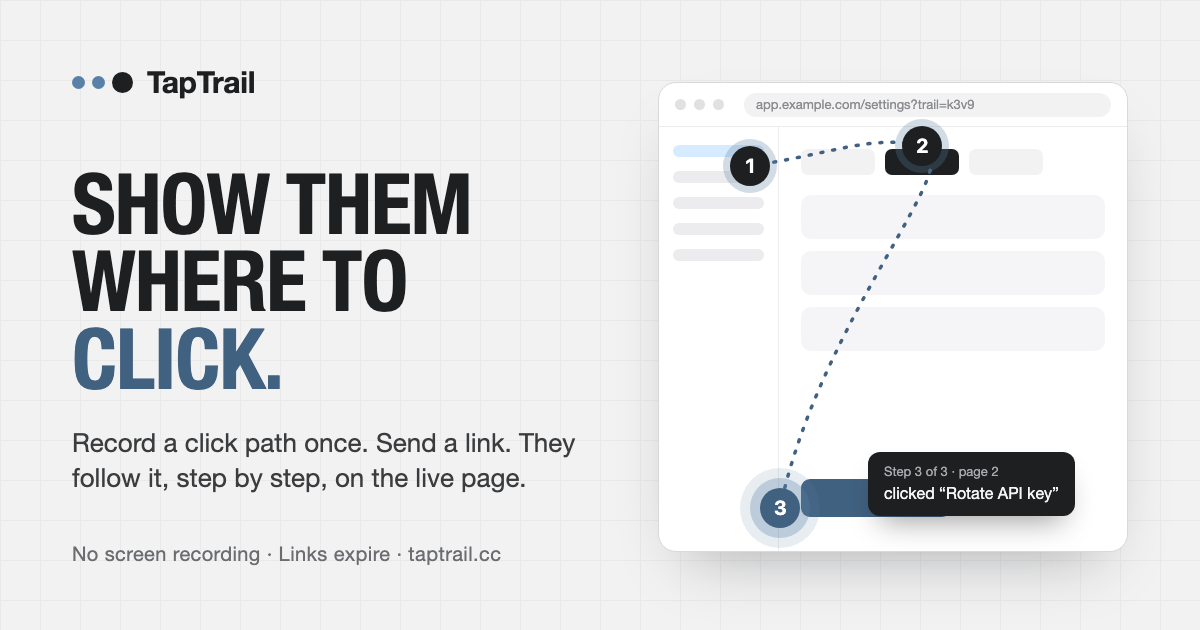
What it looks like
You press Record a trail (or Alt+Shift+R; on a Mac, Option+Shift+R or Ctrl+Shift+R) and use your app normally. Each click becomes a numbered step, and the recording carries on when you move to another page. Press stop, give it a title if you like, choose how long the link should last, and copy the link.
When someone opens it:
- the page scrolls to the first element,
- a numbered marker pulses on it,
- a dotted line connects it to the previous step,
- and a tooltip says something like "Step 3 of 5: clicked 'Advanced'".
They go at their own pace with next and previous, or press play. When the next step is on another page, the replay takes them there. They're clicking the real interface, in their own account, at their own window size.
You can try it in about thirty seconds on the live demo, a pretend admin app with menus, tabs, dialogs and forms.
Why not just send a video?
I kept a simple comparison in mind while building it:
| Screen recording | TapTrail | |
|---|---|---|
| What gets shared | Pixels of your screen | A few kilobytes of steps |
| Shows your data | Everything on screen | Only labels of what you clicked |
| Works at their screen size | No | Yes, it's their live page |
| When the layout changes | The video is wrong | Steps are found again by element |
| Captures typed text | Everything you typed | Only fields the site allows |
| How long it lives | Forever, somewhere | 1 hour, 1 day or 3 days |
A trail isn't a film. It's a short list of "this element, this spot inside it, on this page". That's why it replays at any size, and why a small redesign doesn't break it the way it breaks a video.
The hard parts: menus, tabs and dialogs
Real apps hide things. The button you need is inside a dropdown, behind a tab, in a collapsed section, or in a modal. Pointing at it does nothing if the follower can't see it yet.
So the replay opens the way for you:
- Tabs and collapsed sections that hide the next step are opened automatically.
- Menus, side sheets and dialogs opened by the previous step are opened for you, when it's safe to.
- Native
<dialog>modals work too. The player moves inside the dialog, so its controls stay clickable.
There's an optional auto-tap mode that clicks each step for you as you go. It works from a strict allow-list: same-site links, tabs, section headers, and buttons that say they open something. It refuses anything whose label reads like a real change — delete, remove, revoke, rotate, reset, pay, send, publish, sign out — and leaves those for a human. And it never submits a form.
Privacy was a design constraint, not a feature
I wanted TapTrail to be something you could safely use with customers, so the defaults are strict:
- Typed text is left out by default. A trail says "typed into 'Company name'", not what you typed. The follower types their own.
- A site can allow particular fields, such as a sample project name, with a
data-tt-recordattribute. Even then, the person recording is asked each time: Keep or Leave out. - Passwords, card numbers, one-time codes and anything that looks like a token are never kept, whatever the settings.
- Emails and long numbers are masked as
[email]and[number]in labels and page titles, both in the browser and again on the server. - Visible page text is only used as a label for controls. Clicking a table row doesn't capture the names and amounts inside it.
- Links expire. After that, the trail is deleted.
- Anything inside
data-tt-ignoreis never recorded at all.
Adding it to your app
It's one script tag:
<script type="module" src="https://taptrail.cc/taptrail.js"></script>
That gives every page a small Record a trail button, plus the keyboard shortcut. A couple of options cover most setups:
taptrail.js?button=0hides the button. Record with the shortcut, or from code withTapTrail.start()andTapTrail.stop().taptrail.js?record=0makes the page replay-only. That's what you'd load for customers.
To keep recording to your support team, load the full script for staff and ?record=0 for everyone else. On the server, an upload secret means a trail is only saved if it comes with a short-lived token your own backend signed. Anyone with a link can still follow it.
Under the hood it's a small Node server with no runtime dependencies, no accounts and no third-party analytics.
Where it's useful
The situations I built it for:
- "Where do I click?" in a support reply. Send a path instead of a paragraph.
- Handing off a task: rotate a key, invite a user, publish a report.
- The path to a bug: "it breaks after Settings, then Advanced" becomes a link QA can follow.
- A first walkthrough of an internal tool for a new teammate.
- Skipping the screenshare: they follow it when they have a minute.
- After a release: when the old video points at the wrong corner, record the path again in thirty seconds.
And where it's not the right tool: docs that need to stay up for months, steps that jump to other websites, or anything where you actually want a copy of what was typed into a form.
Try it
- Website: taptrail.cc
- Demo: taptrail.cc/demo. Record a trail, copy the link, and open it in another window.
- How it works in detail: taptrail.cc/about
- What it stores: taptrail.cc/privacy
The next time someone asks where a setting is, try sending the path instead of describing it.